

Master transfer printing terminology for apparel success
Learn essential transfer printing terminology to streamline your custom apparel production, troubleshoot faster, and communicate effectively with vendors and team members.

Running a custom apparel business means juggling dozens of moving parts, but nothing slows production like confusion over transfer printing terminology. You might hear terms like DTF, curing, or substrate tossed around by suppliers and wonder if you’re speaking the same language. Misunderstanding these terms can lead to ordering the wrong materials, troubleshooting issues ineffectively, or miscommunicating with vendors. This guide clarifies the essential transfer printing terminology you need to streamline your workflow, improve quality control, and communicate confidently with everyone in your supply chain. By mastering these terms, you’ll make smarter decisions and run a more efficient operation.
Table of Contents
- Understanding The Basics: Key Terms In Transfer Printing
- Comparing Transfer Printing Terminologies Across Methods
- How Mastering Transfer Printing Terms Improves Production And Troubleshooting
- Practical Application: Using Transfer Printing Terminology To Streamline Your Custom Apparel Business
- Explore DIY Printz Transfer Printing Solutions
- FAQ
Key takeaways
| Point | Details |
|---|---|
| Master core terms | Understanding DTF, heat press, substrate, and curing optimizes your production workflow |
| Compare methods clearly | Different transfer techniques use unique terminology that affects your material and equipment choices |
| Troubleshoot faster | Knowing precise terms helps you identify and solve production issues quickly |
| Communicate effectively | Using correct terminology improves collaboration with vendors, technicians, and team members |
| Apply knowledge daily | Implementing terminology in training and documentation boosts consistency and quality |
Understanding the basics: key terms in transfer printing
Before diving into advanced concepts, you need a solid foundation in the fundamental terminology that drives transfer printing operations. These core terms appear in nearly every conversation about custom apparel production.
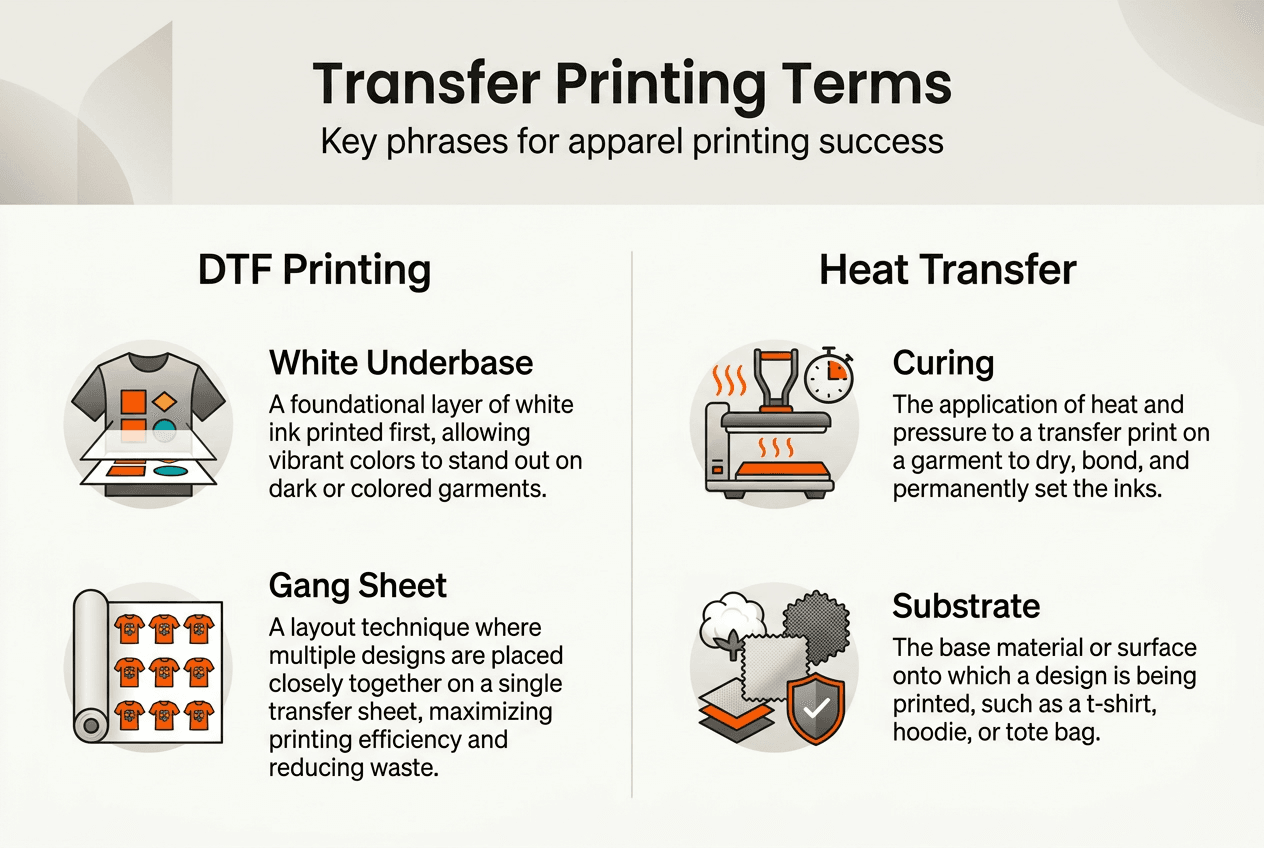
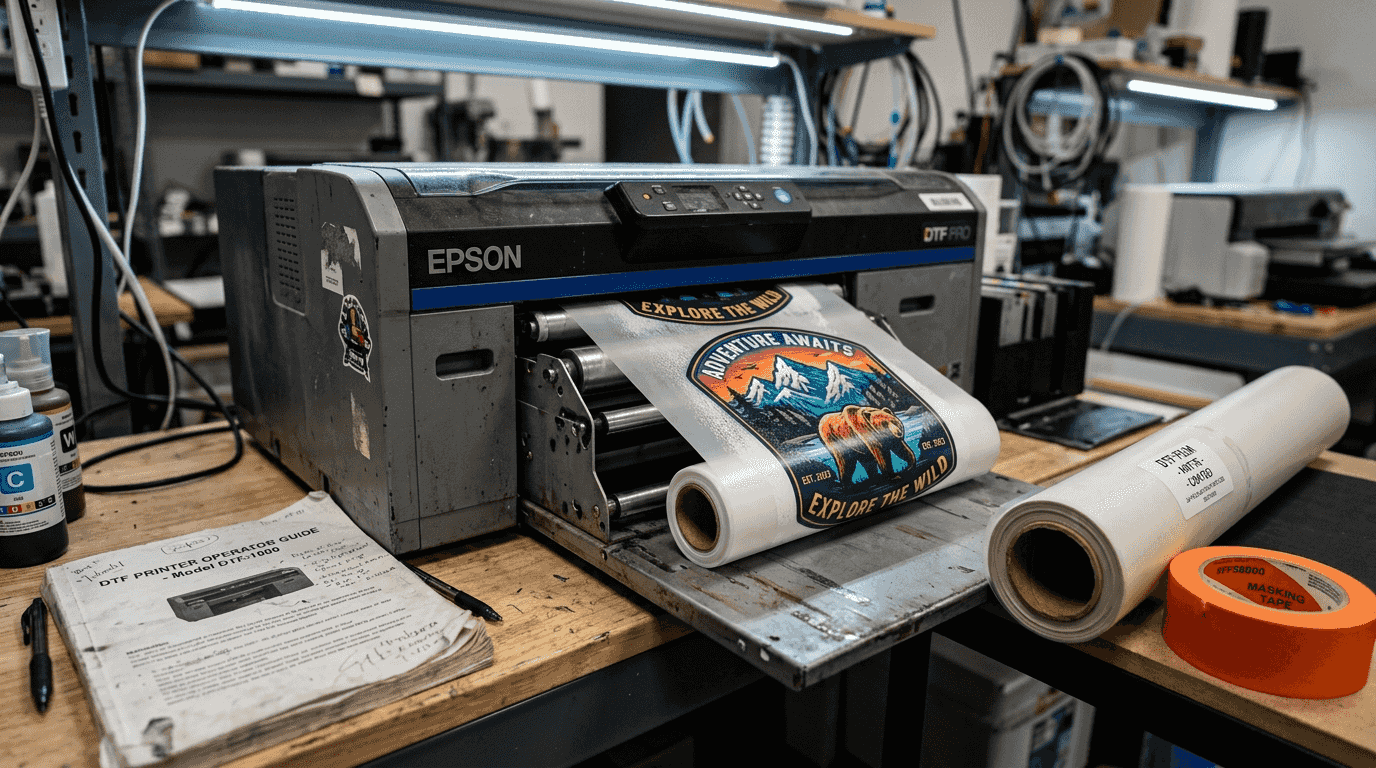
Direct to Film, commonly abbreviated as DTF, represents a modern transfer printing method where designs are printed onto a special film carrier before being heat pressed onto fabric. This technique has revolutionized small business apparel production because it works on virtually any fabric type without the limitations of traditional screen printing. Understanding DTF terminology is crucial for troubleshooting issues, optimizing production, and maximizing print quality.
The heat press is your primary application tool, a machine that uses controlled temperature and pressure to transfer designs from the carrier film onto your substrate. Think of it as a precision oven that bonds ink to fabric through carefully calibrated heat and compression. Modern heat presses come in various sizes and configurations, from small clamshell units perfect for home operations to large automatic machines handling high-volume production.
Your substrate is simply the material receiving the transfer, typically t-shirts, hoodies, tote bags, or any fabric item you’re customizing. Different substrates require different temperature and pressure settings, so knowing your substrate characteristics prevents failed transfers and wasted materials.
Curing refers to the process of fully bonding the transfer to the substrate through heat application. Proper curing ensures your designs withstand repeated washing and wear without cracking, fading, or peeling. The release liner is the protective layer on DTF transfers that you peel away after heat pressing, while the carrier sheet holds your design during the printing and transfer process.
Pro Tip: Create a terminology reference sheet for your team with definitions and visual examples to prevent costly workflow errors and miscommunication.
Heat transfer and transfer printing are often used interchangeably, but transfer printing is the broader umbrella term covering multiple methods including DTF, vinyl, sublimation, and screen print transfers. Heat transfer specifically refers to the application method using heat and pressure. Understanding this distinction helps you communicate more precisely with suppliers and customers about your exact production process.
Comparing transfer printing terminologies across methods
Different transfer printing methods use distinct terminology that can create confusion when you’re evaluating which technique best fits your business needs. Recognizing these differences helps you make informed decisions about equipment, materials, and production workflows.
| Term | DTF Context | Vinyl Context | Screen Print Transfer Context |
|---|---|---|---|
| White underbase | Automatic white ink layer printed first | Not applicable | Manual underbase screen |
| Weeding | Not required | Removing excess vinyl material | Not applicable |
| Gang sheet | Multiple designs on one sheet | Multiple designs plotted together | Not typically used |
| Flash cure | Not applicable | Not applicable | Partial curing between colors |
| Hot peel | Remove liner while hot | Remove carrier while hot | Remove paper while hot |
| Cold peel | Remove liner after cooling | Not common | Remove paper after cooling |
DTF introduces unique terminology that sets it apart from traditional methods. The auto gang sheet refers to software automatically arranging multiple designs on a single film sheet to maximize material usage and reduce waste. This optimization feature saves you money on every print run. Comparisons of terminology used in DTF and other transfer printing methods help fashion retailers understand their options.
The white underbase in DTF printing is automatically generated by the printer software, creating a layer of white ink beneath colored designs to ensure vibrant colors on dark fabrics. This differs dramatically from screen printing, where you manually create and align a separate white underbase screen, adding time and complexity to each job.
Vinyl transfer terminology centers around weeding, the labor-intensive process of removing excess vinyl material around your design before application. DTF eliminates this step entirely since designs print as complete images on film. This time savings becomes significant when you’re producing dozens or hundreds of custom items daily.
Screen print transfers use flash curing, a quick partial cure between color layers that prevents ink mixing while maintaining adhesion for subsequent layers. DTF doesn’t require this step because all colors print simultaneously onto the film. Understanding these method-specific terms prevents confusion when discussing production capabilities with potential clients or evaluating whether to add new services to your business.
The peel temperature terminology applies across methods but with different implications. Hot peel transfers require immediate liner removal while the substrate is still hot, creating a smoother finish but demanding quick, careful handling. Cold peel transfers allow the substrate to cool before liner removal, reducing burn risk and giving you more flexibility in high-volume production environments.
How mastering transfer printing terms improves production and troubleshooting
Knowing the right terminology transforms how you identify and solve production problems. When issues arise, precise language helps you quickly pinpoint whether you’re dealing with equipment malfunction, material defects, or operator error.
Follow this troubleshooting framework using correct terminology. First, examine the transfer itself for issues like incomplete ink coverage, which indicates a printing problem rather than an application issue. Second, check your heat press calibration by verifying actual platen temperature against the display reading, since temperature variance causes adhesion failures. Third, assess your substrate preparation, looking for moisture, oils, or fabric treatments that prevent proper bonding. Fourth, review your pressure settings, as insufficient pressure creates incomplete transfers while excessive pressure can damage delicate fabrics.
Understanding DTF terminology is crucial for troubleshooting issues, optimizing production, and maximizing print quality. When you can accurately describe problems using industry terms, you’ll get faster, more accurate support from equipment manufacturers and material suppliers.
Common troubleshooting terms you’ll use regularly include cracking, where the transfer develops small fractures after washing due to under-curing or incompatible substrate. Ghosting refers to faint residual images appearing where they shouldn’t, typically caused by incomplete liner removal or contaminated platens. Bleeding occurs when colors spread beyond design boundaries, usually from excessive heat or pressure. Adhesion failure means the transfer doesn’t bond properly to the substrate, peeling away during or after application.
Pro Tip: Document every production issue using precise terminology in a troubleshooting log, creating a searchable knowledge base that helps your team solve recurring problems faster.
Color shifting describes unexpected color changes between your design file and the final pressed product, often resulting from incorrect color profiles or substrate interaction. Texture issues refer to unwanted surface characteristics like excessive gloss, matte finish inconsistency, or raised edges that affect the professional appearance of your finished products.
“Mastering transfer printing terminology isn’t just about sounding professional. It’s about building a common language that connects design intent, production execution, and quality outcomes. When your entire team speaks this language fluently, you eliminate the communication gaps that cause costly mistakes and production delays.”
When communicating with vendors about material orders or equipment repairs, using correct terminology ensures you receive exactly what you need. Asking for “DTF film with hot peel characteristics” gets you the right product immediately, while vague requests like “transfer paper” might result in receiving sublimation paper, vinyl carrier sheets, or screen print release paper, none of which work for your DTF operation.
Your DTF troubleshooting becomes systematic rather than guesswork when you can precisely describe symptoms, test specific variables, and communicate findings to technical support. This precision reduces downtime and gets your production line running smoothly again.
Practical application: using transfer printing terminology to streamline your custom apparel business
Applying terminology knowledge strategically throughout your operations creates measurable improvements in efficiency, quality, and profitability. Start by implementing these practical applications in your daily workflow.
Develop standardized operating procedures using precise terminology for every production step. Instead of writing “heat the shirt,” specify “preheat substrate at 320°F for 5 seconds to remove moisture and wrinkles.” This clarity eliminates ambiguity and ensures consistent results regardless of which team member handles the job. Create visual guides showing proper transfer placement, pressure gauge readings, and timer settings with terminology labels that reinforce learning.
Train your team using terminology-focused sessions that connect words to physical actions and outcomes. Have employees practice identifying issues using correct terms, building their diagnostic vocabulary. When someone can distinguish between adhesion failure and incomplete curing, they can adjust the right variable instead of guessing randomly.
Select materials and equipment confidently by understanding specification sheets written in industry terminology. When a supplier lists “90-micron PET film with matte powder adhesive,” you’ll know this describes the film thickness, base material, and adhesive type, helping you evaluate whether it matches your production needs. Using knowledge of transfer printing terms helps optimize production workflows in the apparel and fashion sector.
Implement quality control checkpoints using terminology-based inspection criteria. Create checklists that specify acceptable ranges for characteristics like color accuracy, edge definition, adhesion strength, and surface texture. Train inspectors to identify and document defects using standard terms, making quality data trackable and actionable.
Streamline vendor communication by speaking their language fluently. When ordering custom gang sheets, specify design spacing requirements, bleed allowances, and file format preferences using industry-standard terminology. This precision reduces back-and-forth clarification emails and speeds up order processing.
Optimize your outsourcing strategy by understanding exactly what services you’re purchasing. When you know the difference between pre-pressed transfers and ready-to-press transfers, you can evaluate whether a supplier’s offering matches your production workflow. Use terminology to ask detailed questions about turnaround times, minimum orders, and quality guarantees.
Document your production standards using a terminology glossary specific to your operation. Include your preferred settings for different substrate types, acceptable tolerance ranges for color matching, and troubleshooting decision trees. This living document becomes your training manual, quality reference, and operational playbook.
Leverage terminology knowledge when expanding your service offerings. Understanding the full spectrum of transfer printing methods and their associated terms helps you evaluate which new techniques would complement your existing capabilities and serve your target market effectively.
Explore DIY Printz transfer printing solutions
Now that you understand the terminology driving efficient transfer printing operations, you can make smarter decisions about how to scale your custom apparel business. DIY Printz specializes in high-volume DTF transfer production, handling the technical complexity so you can focus on growing your brand and serving customers.
Our same day DTF transfers auto gang sheet service delivers ready-to-press transfers optimized for maximum material efficiency and minimal waste. You’ll receive professionally printed transfers with perfect white underbase coverage, proper curing, and consistent quality across every order. Whether you’re producing small custom runs or bulk orders for major clients, our streamlined process eliminates the equipment investment, maintenance headaches, and learning curve of operating your own DTF printer.
Pro Tip: Outsourcing transfer production to specialists like DIY Printz lets you offer DTF capabilities without the capital expense, using terminology knowledge to communicate your exact specifications and quality requirements.
FAQ
What does DTF stand for in transfer printing?
DTF stands for Direct to Film, a transfer printing method where designs are printed onto special film carriers before heat pressing onto fabric. This technique offers exceptional versatility, working on cotton, polyester, blends, and even challenging materials like nylon and leather. DTF has become the preferred choice for small apparel businesses because it delivers vibrant, durable prints without the setup costs and minimum order requirements of traditional screen printing.
How can knowing transfer printing terms help small businesses?
Mastering terminology enables you to troubleshoot production issues faster by accurately identifying problems and implementing correct solutions. You’ll communicate more effectively with suppliers, getting exactly the materials and support you need without confusion or delays. This knowledge also helps you train employees consistently, maintain quality standards, and make informed decisions about equipment purchases or service outsourcing. Small businesses that speak the industry language confidently negotiate better deals and build stronger vendor relationships.
What is the difference between heat transfer and transfer printing?
Heat transfer specifically refers to the application method using controlled heat and pressure to bond designs onto substrates. Transfer printing is the broader category encompassing multiple techniques including DTF, vinyl cutting, sublimation, and screen print transfers. All these methods use heat transfer as the application step, but they differ in how the design is created and prepared before pressing. Understanding this distinction helps you discuss your production process precisely with customers and suppliers.
Why is substrate knowledge important in transfer printing?
Different substrates require specific temperature, pressure, and time settings for optimal transfer adhesion and durability. Cotton typically needs higher temperatures than polyester, while blended fabrics require balanced settings to avoid scorching or incomplete bonding. Knowing your substrate characteristics prevents production failures, reduces material waste, and ensures your finished products withstand repeated washing and wear. This knowledge also helps you expand your product offerings by confidently working with diverse fabric types.
What common mistakes happen from terminology confusion?
Businesses often order incompatible materials when they confuse transfer types, like purchasing sublimation paper for DTF printing or vinyl when they need film transfers. Miscommunication about peel temperature can lead to burned operators or damaged products if team members don’t understand hot peel versus cold peel requirements. Incorrect curing terminology might result in under-cured transfers that fail prematurely or over-cured applications that damage delicate fabrics. These mistakes cost time, money, and customer satisfaction, all preventable through clear terminology understanding.
Recommended
READY TO PRINT?
Send us your artwork and we'll dial in your DTF transfer, color, and same-day turnaround.


